


Stack Ball - Crash Platforms
4.521.19K Reviews
App Specs
- Version
- 1.2.38
- Updated On
- License
- Free
- Downloads
- 500,000,000+
- Developer
- CASUAL AZUR GAMES
- Categories
- Arcade
- Platform
- Android, iOS
Screenshots



 Analysis by AppCompare
On a shared phone, a quick game can turn into a tiny household event: one person takes a turn, someone else watches for the dark platforms, and the device goes back to its owner before anyone has to clear space for a long session. That is the kind of casual use I can imagine for Stack Ball - Crash Platforms. Its appeal is immediate, but its simple controls do not make every run effortless; timing still matters, and a brief interruption can cost you a turn.
A game that fits between everyday tasks
I would reach for this arcade game during a short wait rather than when I want a deep, uninterrupted gaming session. A round asks little of you before you begin, so it suits a coffee break, a pause between chores, or a few minutes on the couch. If I were sharing the device, I would agree on a natural stopping point before handing it over. That keeps a casual turn from becoming an awkward debate about who gets the phone next.
It also works as a simple spectator game. A friend can watch the stack and call out when to release, but the person holding the phone still needs to make the tap-and-hold decisions. That makes the game easy to pass around without pretending it has a team mode. If the group wants a game built around cooperation, shared goals, or longer rounds, I would choose something designed for that instead.
Keep turns simple on a shared device
Because play revolves around direct taps, I find it easy to explain the basic interaction to another person: hold to send the ball down, then release to let it bounce. For a shared-device routine, I would keep the handoff simple and avoid passing the phone mid-run. The game is built around a player’s timing, so a clean turn change is less frustrating than trying to coordinate while a level is underway.
It is worth separating the game’s straightforward play from the practical boundaries of a shared account. Purchases and settings can involve the device’s store account, so I would check who is signed in and make sure the person using the phone understands that optional spending is not part of the basic action. The game is free to download, while optional in-app purchases are listed at between $1.99 and $4.99 per item. That is a useful distinction for households: a free starting point does not mean every store option is free.
I would also set a household rule about when the phone is available, rather than relying on a game session to end at a particular moment. Stack Ball is easy to pick up, but a player may want another attempt after a missed landing. Agreeing that turns end after a run, or after a short agreed window, is more practical than expecting the game itself to manage turn-taking.
Who will enjoy the challenge, and who may not
The simple input makes this approachable for people who do not usually play mobile games, while the need to judge when to hold and release gives more experienced casual players something to focus on. I see its best audience as people who like quick reflex challenges and do not mind repeating a compact action to improve a run. It is less suited to someone looking for a story, exploration, strategic planning, or a substantial sense of progression beyond getting further and sharpening their timing.
Worth Reading Before You Choose

EA SPORTS FC Mobile 26 Is a Bigger Football Game, but It Takes Time

Flipboard Shows What News Apps Must Do Beyond the Feed

Switching to Android Auto Means Rethinking Your Driving Routine

Google Calendar Makes a Crowded Week Easier to Manage

Ludo King Makes the Most of the Minutes Between Plans

Baby Panda World Brings Quick Play to Modern Phones, but Its Game Library Feels Busy
That distinction matters when choosing among arcade games. Compared with puzzle games, which often reward pausing to reason through a board, this one puts more weight on immediate reactions. Compared with endless runners, its central appeal is the downward smash-and-release rhythm rather than steering through a constantly moving route. If I want a calmer game that tolerates interruptions, a turn-based puzzle is a better fit; if I want a short burst of focused tapping, Stack Ball makes more sense.
One practical tip is to play with a light touch and keep your attention on the platform pattern rather than holding continuously out of impatience. The hold-and-release control is easy to understand, but the risk is treating every stack as if the same timing will work. As the pace rises and hazardous sections appear more often, I would use short, deliberate presses and release as soon as I need to reassess. That does not remove the challenge, but it makes the control feel more intentional.
Age, trust, and expectations
The game is rated Everyone, which makes it broadly approachable as a casual arcade option. For a child using a family device, I would still explain the difference between playing and making an in-app purchase, and check the device’s usual purchase arrangements. An age rating is helpful context, not a substitute for household expectations about screen time, store spending, or sharing a phone.
CASUAL AZUR GAMES is the developer, and the game’s wide reach suggests it has found a large audience: it has over 500 million installs, with an average rating of 4.4 from around 1.1 million ratings. Those figures are useful context, but they do not guarantee that every player will enjoy its repetition or timing demands. I would treat them as a sign of broad appeal, not a promise that it will suit someone who dislikes reflex-based play.
For someone deciding whether to try it, the practical answer is straightforward: the game is free, rated Everyone, and does not ask you to learn a complicated control scheme before starting. Its current version is 1.2.26, and it requires Android 7.0 or later on Android. If you are choosing a game for a shared iPhone or iPad, the same basic question applies: does the person using it want a quick arcade challenge, and are the device’s account and purchase boundaries already clear?
I would skip it if you need a game that saves a household’s place across separate users, offers a shared campaign, or is forgiving when the phone is handed around mid-level. I would also look elsewhere if ads or optional purchases are a deal-breaker for you. The free-to-play format can be convenient, but anyone who is sensitive to interruptions should try a few sessions and decide whether the overall experience feels comfortable before spending anything.
The Gameplay Experience
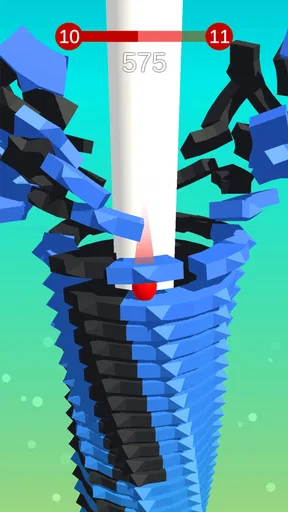
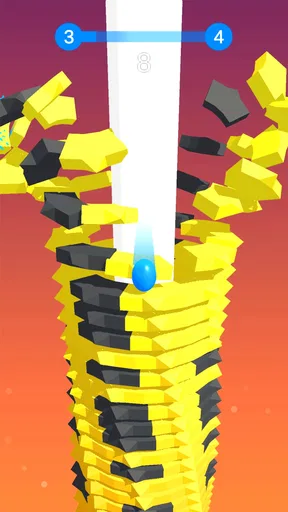
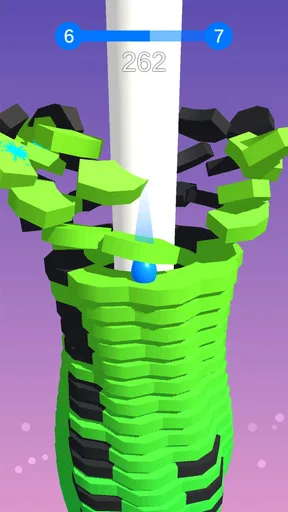
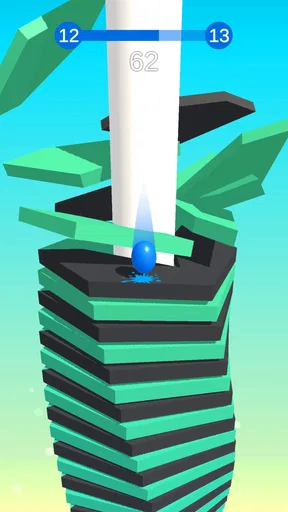
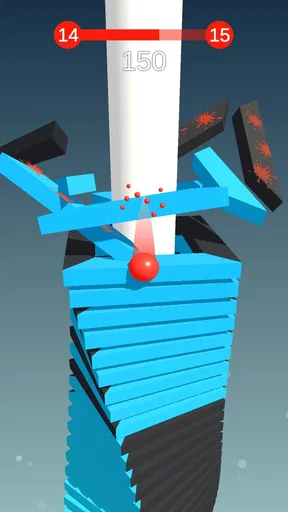
At its core, Stack Ball - Crash Platforms is delightfully simple yet incredibly addictive. The premise is straightforward: you control a bouncing ball that smashes through vibrant stacks of platforms. Your mission? Reach the bottom without hitting the black platforms, which spell instant death. The game cleverly balances ease of play with just enough challenge to keep you coming back for more.
One of the first things you’ll notice is how intuitive the controls are. You simply tap and hold to make the ball smash downwards and release to let it bounce. This simple mechanic makes it easy for anyone to pick up and play, regardless of their gaming experience. It’s one of those "just one more round" games that you can play on a quick coffee break or during a lazy afternoon on the couch.
Visuals and Sound
The visuals in Stack Ball - Crash Platforms are vibrant and colorful, making the game a feast for the eyes. Each level presents a different stack design, with eye-catching color schemes and patterns that keep the visuals fresh. The graphics are clean and smooth, ensuring a seamless gaming experience without any lag or glitches.
Sound-wise, the game features satisfying crash effects that enhance the feeling of smashing through the platforms. The audio isn't overwhelming, which is great because it means you can enjoy the game with or without sound, depending on your mood or setting.
Level Progression and Challenges
As you advance through the levels, the game gradually ups the ante by introducing new challenges and faster-paced gameplay. The black platforms become more frequent, and the pace of the game quickens, requiring quicker reflexes and sharper focus. This progression keeps the game from becoming monotonous and ensures that players remain engaged as they aim to beat their high scores.
Moreover, bonus levels provide an opportunity to earn extra points and rewards, adding a layer of excitement and motivation to keep playing. The difficulty curve is well-balanced, providing a satisfying challenge without becoming frustratingly difficult.
In-App Features and Monetization
Like many free-to-play games, Stack Ball - Crash Platforms incorporates ads and optional in-app purchases. The ads are relatively non-intrusive, appearing mainly between levels, and they can be removed with a one-time purchase if you prefer an ad-free experience.
The in-app purchase options are straightforward, primarily offering ways to remove ads or buy additional lives. It’s a fair model that doesn’t aggressively push you towards spending money, which is a refreshing change from many mobile games.
Final Thoughts
Overall, Stack Ball - Crash Platforms nails the essentials of a great mobile game: simple mechanics, addictive gameplay, and visually pleasing graphics. It’s perfect for those moments when you need a quick gaming fix without diving into a complex storyline or learning intricate controls.
If you're into casual games that you can play at your own pace and enjoy a bit of a smashing good time, this app is definitely worth a download. So, go ahead and give it a spin—you might just find yourself addicted to smashing through those colorful platforms!
Pros
- Simple and addictive gameplay.
- Colorful and vibrant graphics.
- Smooth controls and mechanics.
- Suitable for all age groups.
- Quick to learn
- hard to master.
Cons
- Repetitive after extended play.
- Contains in-app advertisements.
- Limited level variety.
- No multiplayer option.
- May require in-app purchases.
FAQs for Stack Ball - Crash Platforms
What is Stack Ball - Crash Platforms?
Stack Ball - Crash Platforms is an engaging arcade game where players control a 3D ball that smashes through a series of platforms to reach the bottom. The objective is to destroy colored platforms while avoiding the black ones, which can end the game. It's a simple yet addictive game suitable for quick and casual play.
Is Stack Ball - Crash Platforms free to play?
Yes, Stack Ball - Crash Platforms is free to download and play on both Android and iOS devices. However, like many free games, it includes in-app purchases and advertisements. Players can choose to make purchases to enhance their gameplay experience, such as removing ads or obtaining special features.
What are the key features of Stack Ball - Crash Platforms?
The game features vibrant 3D graphics and smooth animations that enhance the gaming experience. Its intuitive controls make it easy for players of all ages to enjoy. The game also offers a variety of levels with increasing difficulty, providing a fun challenge for players who enjoy arcade-style games.
Are there any tips for playing Stack Ball - Crash Platforms effectively?
To excel in Stack Ball, players should focus on timing their taps to avoid black platforms, which can end the game. Practicing patience and maintaining a steady rhythm will help players progress through more challenging levels. Additionally, taking breaks when frustrated can help maintain focus and improve performance.
What are the pros and cons of Stack Ball - Crash Platforms?
Pros include simple controls, addictive gameplay, and visually appealing graphics. It's a great game for quick entertainment and stress relief. However, the cons might include repetitive gameplay and frequent ads, which can interrupt the gaming experience. In-app purchases might also not appeal to all players.


